Migaku Alternatives (2026): 6 Options Compared
Migaku has no free plan. We compare 6 alternatives, from Lingosive and Language Reactor to asbplayer and Jiten, on streaming sites, Anki and Japanese.
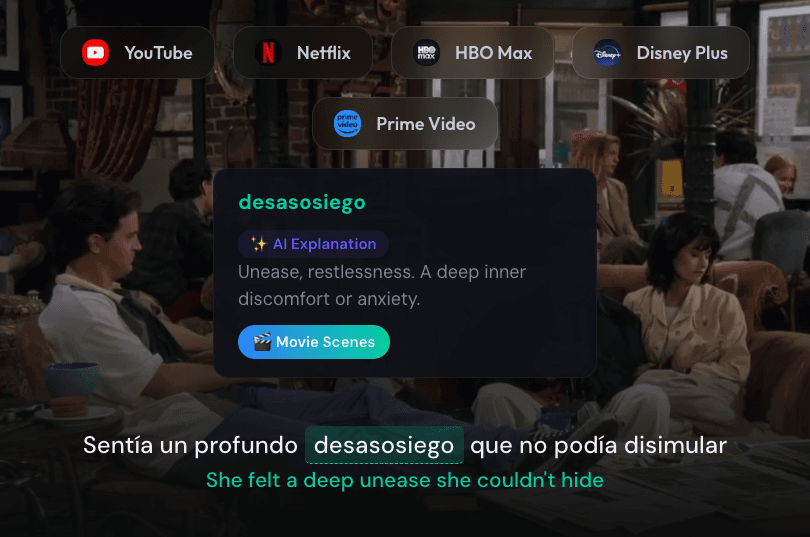
The best Migaku alternative depends on which part of Migaku you want to replace. For dual subtitles on Netflix, YouTube, Disney+, Prime Video and HBO Max with a free plan, try Lingosive. If you only watch Netflix and YouTube, Language Reactor's free mode goes a long way. For free sentence mining into Anki, use asbplayer; for Japanese vocabulary, Jiten. Trancy adds course sites like Udemy and Coursera, and Lingopie suits you if you don't have Netflix or another streaming subscription. As of November 2026, Migaku itself has no free plan: its pricing page offers a 10-day money-back guarantee instead.
We make Lingosive, so weigh our pick accordingly. Every detail about the other tools comes from their own websites, help pages, documentation or Chrome Web Store listings, checked on November 4, 2026, and we point out where a company's own sources disagree.
Migaku Alternatives at a Glance
Where each tool adds subtitles in a desktop browser:
| Netflix | YouTube | Prime Video | Disney+ | HBO Max | |
|---|---|---|---|---|---|
| Migaku (for reference) | ✓ | ✓ | Not listed | ✓ | Not listed |
| Lingosive | ✓ | ✓ | ✓ | ✓ | ✓ |
| Language Reactor | ✓ | ✓ | ✗ | ✗ | Not listed |
| Trancy | ✓ | ✓ | Not listed | ✓ | ✓ |
| asbplayer | ✓ | ✓ | ✓ | ✓ | ✓ |
Lingopie and Jiten aren't in this table. Lingopie streams its own catalog of shows and movies; its Chrome extension, according to Lingopie's beginner's guide, works with select Netflix and Disney+ titles. Jiten doesn't put subtitles on video itself; for that, it works alongside asbplayer.
How each one fits the way you study:
| Anki and sentence mining | Japanese and Chinese | Phone app | Free plan | |
|---|---|---|---|---|
| Migaku | One-click cards with a screenshot and audio; optional Anki export | Both, plus Cantonese; pitch-accent and tone trainers | iOS and Android | No; 10-day money-back guarantee |
| Lingosive | Saved words become flashcards automatically; no Anki export | Japanese throughout; Chinese in the extension only | iOS and Android | Yes |
| Language Reactor | Anki export with screenshots and audio; saving words as you watch needs Pro | Both, among 40+ languages | None from its maker; the website works on phones | Yes; optional Pro |
| Trancy | Its own flashcards; CSV export, no Anki integration listed | Up to 10 learning languages; list not published | iOS and Android | Yes; optional Premium |
| asbplayer | Built for it: cards go straight to Anki | Any language you have subtitles in | None; some Android browsers, with features missing | Free and open source |
| Lingopie | Its own flashcards; no Anki export listed | Both, among 17 languages | iOS, Android and TV apps | No; 7-day free trial |
| Jiten | Built-in flashcards, Anki deck export, sentence mining | Japanese only | None; the website works on phones | Free and open source; optional Jiten+ |
✗ means the product's own materials say it isn't supported; "Not listed" means it isn't among the sites the product names. A free plan here is one you can keep using without paying. Beyond these five, Migaku also lists Rakuten Viki and Animelon, Trancy lists TED, Udemy, Coursera and edX, and asbplayer lists Crunchyroll, Hulu, Rakuten Viki and more.
1. Lingosive: Five Streaming Sites and a Free Plan
Lingosive is a browser extension for Chrome, Edge, Brave and other Chromium browsers that adds dual subtitles to Netflix, YouTube, Prime Video, Disney+ and HBO Max. The top line is the subtitle track you pick, with every word clickable, and the bottom line is a machine translation into your own language. Instead of building cards, you save words as you watch, and they come back as spaced-repetition flashcards in the iOS and Android apps and on the web.
Best for: watching on more than Netflix and YouTube, especially Prime Video or HBO Max, if you'd rather watch than make cards.
Pros
- A free plan: dual subtitles and word translation work without an account, and a free account saves up to 100 words and phrases and includes 10 AI explanations a day. Premium removes those limits; our pricing page shows the price in your country.
- Click a word and Lingosive AI explains what it means in that exact sentence, with a short grammar note where it helps, and synonyms.
- The apps come with 400,000+ YouTube videos and podcasts and 15,000+ books, so you can keep practicing away from your computer.
- Word in Film plays real movie and TV scenes where a word or phrase is said, drawn from 50 million+ video contexts in English, Spanish, French, German and Japanese.
Cons
- No Anki export, and no one-click cards with a screenshot and audio from the scene you're watching.
- No Firefox or Safari version, and outside the five streaming sites it only translates text you select.
- Flashcards and the app library cover English, Spanish, French, German, Italian, Portuguese, Russian and Japanese, so not Chinese or Korean.
2. Language Reactor: A Free Tool for Netflix and YouTube
Language Reactor, formerly Language Learning with Netflix, adds bilingual subtitles, a click-for-definition dictionary and precise playback controls to Netflix and YouTube. Its extension runs in Chrome on Windows and macOS, and its website adds PhrasePump listening practice, a YouTube catalog and an AI chat partner called Aria.
Best for: learners who only watch Netflix and YouTube and want a capable free tool, or a route into Anki.
Pros
- A free mode that covers the essentials: two subtitle lines, a dictionary, auto-pause and keyboard shortcuts.
- Content in 40+ languages, with transliteration for other writing systems; its October 2026 update improved word recognition in Japanese, Chinese and Korean, among others.
- Flashcard export to Anki with screenshots and audio clips.
Cons
- Netflix and YouTube only: its FAQ says Disney+ and Amazon Prime aren't supported yet.
- On Netflix, the free mode uses the subtitle tracks Netflix provides. Machine translation and saving words outside PhrasePump, which Anki export depends on, are part of Pro.
- No app from its maker, though its website works on phones and tablets.
For more on it, see our Language Reactor alternatives guide.
3. Trancy: Course Sites and the Most Browsers
Trancy is an AI-focused extension with iOS and Android apps. Its manual lists bilingual subtitles on eight desktop sites: YouTube, Netflix, Disney+, HBO Max, TED, Udemy, Coursera and edX. It also translates web pages and PDFs.
Best for: subtitles on course platforms, and anyone who browses in Firefox or Safari.
Pros
- Runs in Chrome, Edge, Firefox, Brave, Arc and Safari.
- A free plan with bilingual subtitles, word and sentence translation, web-page translation and flashcard practice.
- Exports a video's subtitles, with your saved words, as a PDF or CSV file.
Cons
- Prime Video isn't on its list of sites.
- The AI features, including AI word definitions, grammar analysis and AI subtitles for YouTube, are part of Premium, and the free plan saves up to 100 words and 50 sentences.
- It supports up to 10 learning languages but doesn't publish the list, so check Japanese or Chinese in the app before you commit. No Anki integration is listed.
We compare it with Lingosive row by row in Lingosive vs Trancy.
4. asbplayer: Free Sentence Mining Into Anki
asbplayer is a free, open-source browser extension and web player for learning from subtitled video. It puts selectable subtitles on streaming video or on your own files and turns a line into a flashcard with audio and a screenshot, sent to Anki through the AnkiConnect add-on. It grew out of the Japanese-learning community, and it's the nearest free match for Migaku's one-click mining.
Best for: Anki users who don't mind setting things up themselves.
Pros
- Dedicated support for Netflix, YouTube, Prime Video, Disney+, HBO Max, Crunchyroll, Hulu, Rakuten Viki and more, plus a generic detector that its docs say works on about 85% of other sites.
- Shows several subtitle tracks at once, so you can add one in your language for dual subtitles.
- Playback modes built for immersion, such as condensed playback that skips parts without subtitles, auto-pause and line repeat.
Cons
- More setup than Migaku: for lookups you add a dictionary such as Yomitan, and for cards you need Anki with AnkiConnect.
- No flashcard app of its own; your reviews happen in Anki.
- On phones, its docs cover Android browsers only, such as Firefox for Android, with several features missing. They also note that subtitle timing on Prime Video is sometimes off by 30 seconds.
5. Lingopie: Its Own Catalog, No Streaming Subscription
Lingopie is a streaming service for language learners, built around its own catalog, which it puts at 5,000+ TV shows and movies. You watch with dual subtitles and clickable words, then practice with flashcards, quizzes and a grammar coach.
Best for: learners who don't have Netflix or another streaming subscription, or who want to study on the TV.
Pros
- No other streaming subscription needed for its catalog.
- 17 languages, including Japanese, Korean and Chinese.
- Apps for iPhone and Android, plus TV apps for Roku, Android TV and Fire TV.
Cons
- No free plan on its website, just a 7-day free trial that needs a valid payment method. Our Lingopie free trial and pricing guide has the details.
- Its apps play its own catalog, not your Netflix or Disney+ queue. Membership also includes a Chrome extension that Lingopie says you use "alongside the streaming platforms you already have access to"; its beginner's guide says the extension works with "select Netflix and Disney+ content", and its Chrome Web Store listing doesn't name the supported sites.
- No Anki export listed.
6. Jiten: Free Japanese Vocabulary and Mining
Jiten is a free, open-source site for Japanese learners. Its library covers thousands of anime, dramas, novels, visual novels and games with vocabulary statistics, so you can see how much of a title you'd understand before you start, then study the words you're missing.
Best for: Japanese learners who liked Migaku's known-word tracking and mining and don't mind combining a few tools.
Pros
- Free core features; an optional Jiten+ subscription adds extras.
- Built-in flashcards using the FSRS algorithm, Anki deck export with filters, and an import of the words you already know from Anki.
- The free Jiten Reader extension for Chromium browsers and Firefox looks up and color-codes Japanese on web pages, and works with asbplayer for mining from video.
Cons
- Japanese only.
- No subtitles of its own: for streaming video, you pair it with asbplayer.
- No app, though the website works in a phone browser.
When Migaku Is Still the Better Pick
Migaku is worth paying for if:
- You want one package that does it all, with an extension, phone apps, its own flashcard system and courses, and little setup. Migaku says setting it up "just takes a couple minutes."
- You're learning Japanese or Mandarin and want structure. Its Fundamentals and Academy courses cover Japanese, Mandarin, Korean and English, and it adds a kanji course, a pitch-accent trainer for Japanese and a tone trainer for Mandarin.
- You like one-click cards with a screenshot and audio from the exact scene, reviewed in a phone app rather than in Anki.
- You read paper books or manga and want to scan text with your phone's camera (OCR).
- You're learning Cantonese or Vietnamese, both on Migaku's list of 11 languages.
For a row-by-row comparison with a source for each row, see Lingosive vs Migaku; our Migaku pricing guide covers its plans.
Switching From Migaku
- Keep your cards. Migaku can export flashcards to Anki, which matters if you move to asbplayer, Jiten or plain Anki. Jiten can also import the words you already know from Anki.
- Match your platforms. Check the first table for the sites you actually watch on.
- Set up your pick. For Lingosive, install it from the download page, choose your own language and the one you're learning, and sign in if you want to save words. Then open a show, turn on subtitles in the language you're learning and press N to add the translation line.
- Plan your reviews. Lingosive, Trancy and Lingopie have their own flashcard review, Jiten reviews on its website, and asbplayer leaves reviews to Anki.
Frequently Asked Questions
Is there a free alternative to Migaku?
Yes. asbplayer and Jiten are free and open source; Jiten's optional Jiten+ subscription only adds extras. Lingosive, Language Reactor and Trancy have free plans with paid upgrades. Lingopie has no free plan on its website, only a 7-day free trial.
Does Migaku have a free trial?
Not according to its pricing page, which offers a 10-day money-back guarantee instead, and there's no free plan. Its Chrome Web Store listing still mentions a free 10-day trial, so check the pricing page before you sign up. See our Migaku pricing guide for its plans.
Do I need Anki?
Not for Migaku, Lingosive, Trancy, Lingopie or Jiten, which all have their own flashcard review. asbplayer sends its cards to Anki, and Language Reactor exports to Anki with Pro. Lingosive has no Anki export, so if Anki is central to your routine, asbplayer, Jiten or Language Reactor will suit you better.
What's the best Migaku alternative for Japanese?
For mining and vocabulary at no cost, Jiten with asbplayer covers much of what Migaku does, in exchange for more setup. Lingosive works with Japanese throughout: the extension, the app's videos and books, flashcards and Word in Film. Language Reactor handles Japanese too. Migaku still has the most built-in Japanese tools, including a kanji course and a pitch-accent trainer.
What about Chinese?
Migaku covers Mandarin and Cantonese and adds a tone trainer. Language Reactor and Lingopie also support Chinese. Lingosive's extension shows Simplified and Traditional Chinese subtitles, but its app library and flashcards don't include Chinese.
Should I choose Migaku or Language Reactor?
Language Reactor is free to start and strong on Netflix and YouTube in desktop Chrome, but it has no app, and saving words as you watch needs Pro. Migaku is paid only, works on Netflix, YouTube, Disney+, Rakuten Viki and Animelon, and adds phone apps, its own flashcards and courses. If you mostly watch Netflix and YouTube and already use Anki, start with Language Reactor.
Start practicing today!
Get started for free
The extension works in Chrome, Edge and Brave on a computer.
All download optionsKeep reading
- Best AI for Language Learning from TV Shows and YouTube (2026)Language learning AI for shows and YouTube: which tools explain words in context, coach speaking or …
- Migaku Pricing (2026): Cost, Free Trial and Lifetime PlanMigaku has no free plan; its pricing page offers a 10-day money-back guarantee, not a free trial. Mo…
- Best Chrome Extensions for Language Learning (2026)The best Chrome extensions for language learning, sorted by what you do online: watch, read, look up…