Best Dual Subtitles Chrome Extensions (2026)
Dual subtitles Chrome extensions compared: which work on Netflix, YouTube, Prime Video, Disney+, HBO Max or Udemy, with AI help, phone apps and free plans.
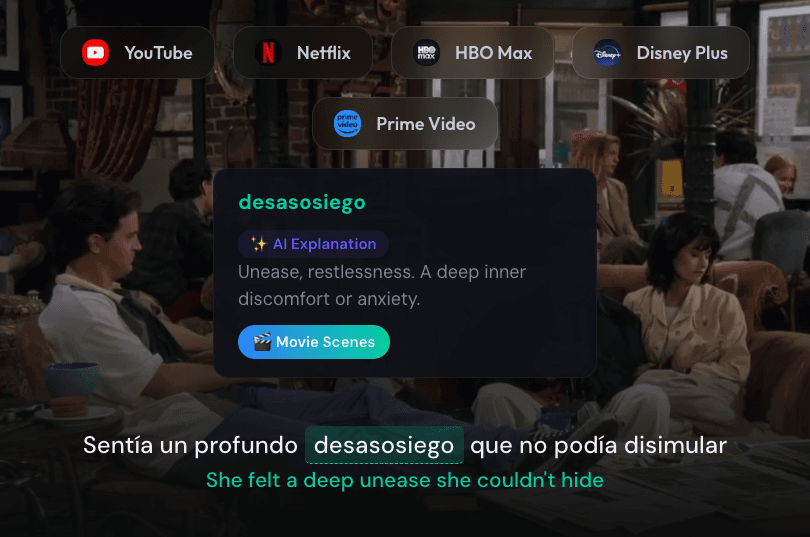
None of the four extensions compared here adds dual subtitles to every website, so the best dual subtitles extension for Chrome depends on where you watch and how you like to review. Lingosive covers Netflix, YouTube, Prime Video, Disney+, and HBO Max and comes with iOS and Android apps; Language Reactor is a strong free choice if you only watch Netflix and YouTube; Migaku is a paid, flashcard-first tool with extra depth for Japanese and Mandarin; and Trancy lists the widest range of video sites, including course platforms like Udemy and Coursera. Which sites each one covers is the first thing to check.
New to the idea? Our dual subtitles guide explains what dual subtitles are, whether they help you learn, and how to get them on each platform, including what works on a phone or TV.
We make Lingosive, so we've kept this comparison to what each company publishes about its own product. Every rival detail below comes from that product's website, help pages, manual, forum, or Chrome Web Store listing as of October 2026, and we say plainly where another tool is the better pick.
What Makes a Dual Subtitle Extension Good
Four things separate a useful extension from a frustrating one.
Platform coverage. Your learning shouldn't stop because a show lives on a different service. Check that the extension supports the platforms you actually pay for.
Word interaction. Seeing "hola = hello" is a start, but understanding why a character used pues the way they did is what builds real comprehension. Look for lookups that take the whole sentence into account.
Mobile continuity. Most people spend more time on their phones than at their desks. An extension that hands your saved words to a phone app keeps them in front of you.
Review. Words you meet once and never see again fade within days. Built-in spaced repetition, or a clean export to a flashcard app, closes that gap.
No single tool wins on all four, which is why the right choice depends on your habits.
The Four Extensions in 2026
Lingosive
Lingosive adds dual subtitles to Netflix, YouTube, Prime Video, Disney+, and HBO Max, and it's the only one of the four that lists Prime Video (see how it works on Prime Video). The subtitles come from the track you turn on in the player, and the second line, which you switch on with N or the double subtitle button, is a machine translation of each line into your own language, so you still get two languages when a show has no subtitle track in yours.
Hover over a word for a quick translation. Click it and the AI explains what it means in that exact sentence, with a short grammar note where it helps and a few synonyms; click Learn on the same card to save the word. Once you're signed in, subtitle words are color-coded as known, learning, or above your level.
Saved words sync to the iOS and Android apps and the web learning center, where they come back as spaced-repetition flashcards. The apps also include a library of 400,000+ YouTube videos and podcasts with dual subtitles, plus a reader with 15,000+ books, and Word in Film lets you type a word or short phrase and watch real movie and TV scenes where it's said, drawn from 50 million+ video contexts.
The limits: Lingosive doesn't add dual subtitles on other websites (there it translates text you select), there's no Firefox or Safari version, it doesn't export to Anki, and its flashcard practice and app library don't yet cover every language the extension supports (Korean and Chinese, for example).
Platforms: Netflix, YouTube, Prime Video, Disney+, HBO Max
AI: Word explanations in context, with a daily limit on the free plan
Mobile: iOS and Android apps with their own video and book library
Free plan: Yes, with limits that Premium removes
Language Reactor
Language Reactor, formerly Language Learning with Netflix, is one of the best-known names in this category: its homepage counts more than 2,000,000 users. Its extension adds language tools to the Netflix and YouTube websites, and as of October 2026 its FAQ says Disney+ and Amazon Prime aren't supported.
Within those two sites it's very capable. You get bilingual subtitles, auto-pause after each line, keyboard shortcuts for jumping between and replaying subtitles, and a click-to-look-up dictionary with Lexa AI explanations, plus highlighting by learning stage. Saved items export to Anki or CSV, and its website adds PhrasePump listening reviews, an AI chat partner called Aria, and a catalog of YouTube videos, Netflix titles, podcasts, and books you can filter by difficulty.
On Netflix, the free plan uses the subtitle tracks Netflix itself provides. Machine translation and speech recognition on Netflix, saving words outside PhrasePump, and the enhanced AI model are part of Pro. There's no iOS or Android app: its homepage says Language Reactor also works on phones and tablets, and its team suggests using the website in a mobile browser, while the extension runs only in desktop Chrome.
Platforms: Netflix, YouTube
AI: Lexa AI explanations (basic on the free plan, enhanced with Pro)
Mobile: No app; the website works in a mobile browser
Free plan: Yes; saving words outside PhrasePump requires Pro
Migaku
Migaku is built around one idea: turn the sentences you meet in real content into flashcards. As of October 2026, its Chrome extension supports Netflix, YouTube, Disney+, Rakuten Viki, and Animelon, and it also makes web pages clickable for reading. Cards take one click and can include the sentence, audio, a screenshot, a definition, and an AI explanation, and Migaku's AI also breaks down how a sentence works.
You don't need Anki to use it. Reviews happen in Migaku's own spaced-repetition system, in its iOS and Android apps or at study.migaku.com, and Anki export is optional. The apps also play YouTube, run Migaku's courses, and read text through your camera (OCR), which is handy for books and manga. For Japanese there's a kanji course and a pitch-accent trainer, and for Mandarin a tone trainer.
The tradeoff is price: there's no free plan. As of October 30, 2026, its pricing page lists monthly and yearly plans with a 10-day money-back guarantee, plus a one-time lifetime plan.
Platforms: Netflix, YouTube, Disney+, Rakuten Viki, Animelon
AI: Word explanations in context and sentence breakdowns
Mobile: iOS and Android apps (YouTube, flashcards, courses, OCR)
Free plan: No (10-day money-back guarantee)
Trancy
Trancy is an AI-focused extension for Chrome, Edge, Firefox, and Safari, with iOS and Android apps. As of October 2026, its manual lists bilingual subtitles on YouTube, Netflix, Disney+, HBO Max, and TED on desktop, plus course subtitles on Udemy, Coursera, and edX; Prime Video isn't on that list. On mobile, video learning centers on YouTube, with podcasts on iOS.
Beyond subtitles, Trancy offers AI word definitions and grammar analysis, an AI speaking partner, and translation for web pages and PDFs. Saved words and sentences go to a web Learning Center with flashcard practice. The free plan covers bilingual subtitles, word and sentence translation, web-page translation, and flashcard practice, but caps how many words and sentences you can save; the AI features, including AI word definitions, grammar analysis, and the speaking partner, are part of Premium.
Platforms: YouTube, Netflix, Disney+, HBO Max, TED, Udemy, Coursera, edX
AI: Word definitions, grammar analysis, and a speaking partner, all with Premium
Mobile: iOS and Android apps (video learning centers on YouTube)
Free plan: Yes; the AI features need Premium
Full Feature Comparison
| Lingosive | Language Reactor | Migaku | Trancy | |
|---|---|---|---|---|
| Netflix | ✓ | ✓ | ✓ | ✓ |
| YouTube | ✓ | ✓ | ✓ | ✓ |
| Prime Video | ✓ | ✗ | Not listed | Not listed |
| Disney+ | ✓ | ✗ | ✓ | ✓ |
| HBO Max | ✓ | ✗ | Not listed | ✓ |
| Other video sources | Its apps and web learning center: 400,000+ YouTube videos and podcasts | Its website: YouTube catalog, podcasts, your own video files | Rakuten Viki, Animelon, your own video files | TED, Udemy, Coursera, edX |
| AI word explanations | ✓ (daily limit on the free plan) | ✓ (basic on the free plan, enhanced with Pro) | ✓ | ✓ (Premium) |
| Built-in review | Spaced-repetition flashcards | PhrasePump and flashcards | Spaced-repetition flashcards | Flashcard practice |
| iOS and Android apps | ✓ | ✗ | ✓ | ✓ |
| Learning languages | 13 | 40+ | 11 | Up to 10 |
| Browsers | Chrome, Edge, Brave | Chrome (desktop) | Chrome (desktop) | Chrome, Edge, Firefox, Safari |
| Free plan | ✓ | ✓ | ✗ (10-day money-back guarantee) | ✓ |
Rival details come from each product's own pages, checked in October 2026. ✗ means the product's own materials say it isn't offered; "Not listed" means it doesn't appear in the list of platforms the product publishes. Language counts are each product's own; Lingosive's 13 counts Simplified and Traditional Chinese separately, and its flashcard practice doesn't cover all 13 yet.
For a closer look at one rival, each head-to-head page has a source for every row: Lingosive vs Language Reactor, Lingosive vs Migaku, and Lingosive vs Trancy. Dualsub, another dual subtitles extension, isn't in this roundup: its changelog shows it dropped Netflix, Disney+ and Prime Video in late 2024, and Lingosive vs Dualsub covers what it still supports.
Is There a Dual Subtitles Extension for Any Site?
Not among these four. Each one adds a second subtitle line only on the video sites it lists:
- Lingosive: Netflix, YouTube, Prime Video, Disney+, HBO Max
- Language Reactor: Netflix, YouTube
- Migaku: Netflix, YouTube, Disney+, Rakuten Viki, Animelon
- Trancy: YouTube, Netflix, Disney+, HBO Max, TED, Udemy, Coursera, edX
Outside those lists, a few tools offer something else: Lingosive translates text you select on any web page, Migaku makes web page text clickable, and Language Reactor and Migaku can open video files you already have. On other streaming sites you're left with the site's own subtitles, so check that your service is on the list before you install. For the platforms Lingosive covers, our dual subtitles guides walk through the setup step by step.
Installing Lingosive
- Get the extension from the Lingosive download page. It works in Chrome, Edge, Brave, and other Chromium browsers.
- Choose your own language and the language you're learning, then sign in, since AI explanations and saving words need an account.
- Start a show and turn on subtitles in the language you're learning from the player's own subtitle menu. Lingosive replaces them with clickable subtitles.
- Click the double subtitle button next to the subtitles, or press N, to add a translation line in your language.
- Install the iOS or Android app to review your saved words on your phone.
Which Extension Fits Which Learner
Lingosive: you watch on more than Netflix and YouTube, especially Prime Video, Disney+, or HBO Max, and you want your saved words waiting on your phone, along with a video and book library to keep practicing.
Language Reactor: you only watch Netflix and YouTube, you prefer Netflix's own subtitle tracks to machine translation, or you already review in Anki and want extras like PhrasePump and the Aria chat partner.
Migaku: you're learning Japanese or Mandarin (or another of its 11 languages), you want flashcards with a screenshot and audio from the scene, and you're happy to pay for a plan.
Trancy: you want subtitles on course sites like Udemy and Coursera, translation for web pages and PDFs, or an extension that runs in Firefox.
Tips for Getting More from Dual Subtitles
Don't just watch. Save. Five saved words per episode adds up to about 1,800 words a year if you watch an episode a day, and regular review is what keeps them.
Use both subtitle lines strategically. Start with both visible. As your listening improves, switch the translation line off for stretches (in Lingosive, press N), or turn on Blur mode (press B) so a line stays blurred until you hover over it. The discomfort of not understanding right away is where progress happens.
Meet each word in more than one scene. A word you've heard from several speakers in different situations is much easier to recognize next time. In Lingosive's Word in Film, you can look up the words you saved and hear them in other real movie and TV scenes, and our guide to language learning with Netflix has a Netflix-specific setup and show picks in seven languages.
Frequently Asked Questions
Can I use these extensions on mobile Netflix?
No. Browser extensions don't run inside the Netflix mobile app, and as of October 2026 none of these four adds dual subtitles there; Migaku's and Trancy's apps focus on YouTube on mobile. Lingosive's iOS and Android apps have their own library of 400,000+ YouTube videos and podcasts, plus 15,000+ books, so you can keep practicing without a streaming subscription.
Which of these extensions are free?
As of October 2026, Lingosive, Language Reactor, and Trancy have free plans with limits and paid upgrades, while Migaku has no free plan; its pricing page offers a 10-day money-back guarantee instead. On Lingosive's free plan, dual subtitles and word translation are included, with daily limits on AI explanations and Word in Film searches and a cap on saved words. Trancy's free plan doesn't include its AI features, which are part of Premium.
Do any of these extensions make AI subtitles?
Some can create subtitles from the audio. Language Reactor's Pro plan adds speech recognition on Netflix and YouTube, and Trancy's Premium adds AI subtitle transcription for YouTube videos. Lingosive works from the subtitle track the video already has: its second line is a machine translation of each line, and its AI explains a word you click in the context of that sentence.
Are these extensions affiliated with Netflix or other platforms?
No. All four are independent products from their own developers (Language Reactor is made by Dioco, Migaku by Migaku Inc., and Trancy by L2D Limited), not official tools of Netflix, YouTube, Prime Video, Disney+, or HBO Max. Lingosive works with the subtitle tracks the player already provides and shows them as clickable text.
What's the difference between translation and AI explanation?
A translation tells you what a word usually means. An AI explanation tells you what it means in the sentence you just heard, which matters for words with several meanings, slang, and fixed expressions. In Lingosive, clicking a word gives you its meaning in that sentence, a short grammar note when it helps, and synonyms.
Start practicing today!
Get started for free
The extension works in Chrome, Edge and Brave on a computer.
All download optionsKeep reading
- Best Chrome Extensions for Language Learning (2026)The best Chrome extensions for language learning, sorted by what you do online: watch, read, look up…
- Best AI for Language Learning from TV Shows and YouTube (2026)Language learning AI for shows and YouTube: which tools explain words in context, coach speaking or …
- Language Reactor Pricing (2026): Is It Free? Is Pro Worth It?Yes, Language Reactor has a free mode. See Pro's monthly, 3-month and yearly prices (checked Oct 30,…